HOME SKILLS BLOG GITHUB
// SKILL // NEW IN V2.4.0

AGENT READINESS
AUDIT

The seo-agentic skill checks how well AI agents that browse, fill forms, and act for people can read and use a site. It explains the Lighthouse Agentic Browsing result as an exact fraction and audits the accessibility tree, agent access policy, llms.txt, Markdown delivery, discovery files, and optional WebMCP tools.

By Daniel Agrici · Command surface verified: against the v2.4.0 source

$
/seo agentic https://your-site.com

REQUIRES CLAUDE SEO V2.4.0 OR LATER INSTALLED IN CLAUDE CODE

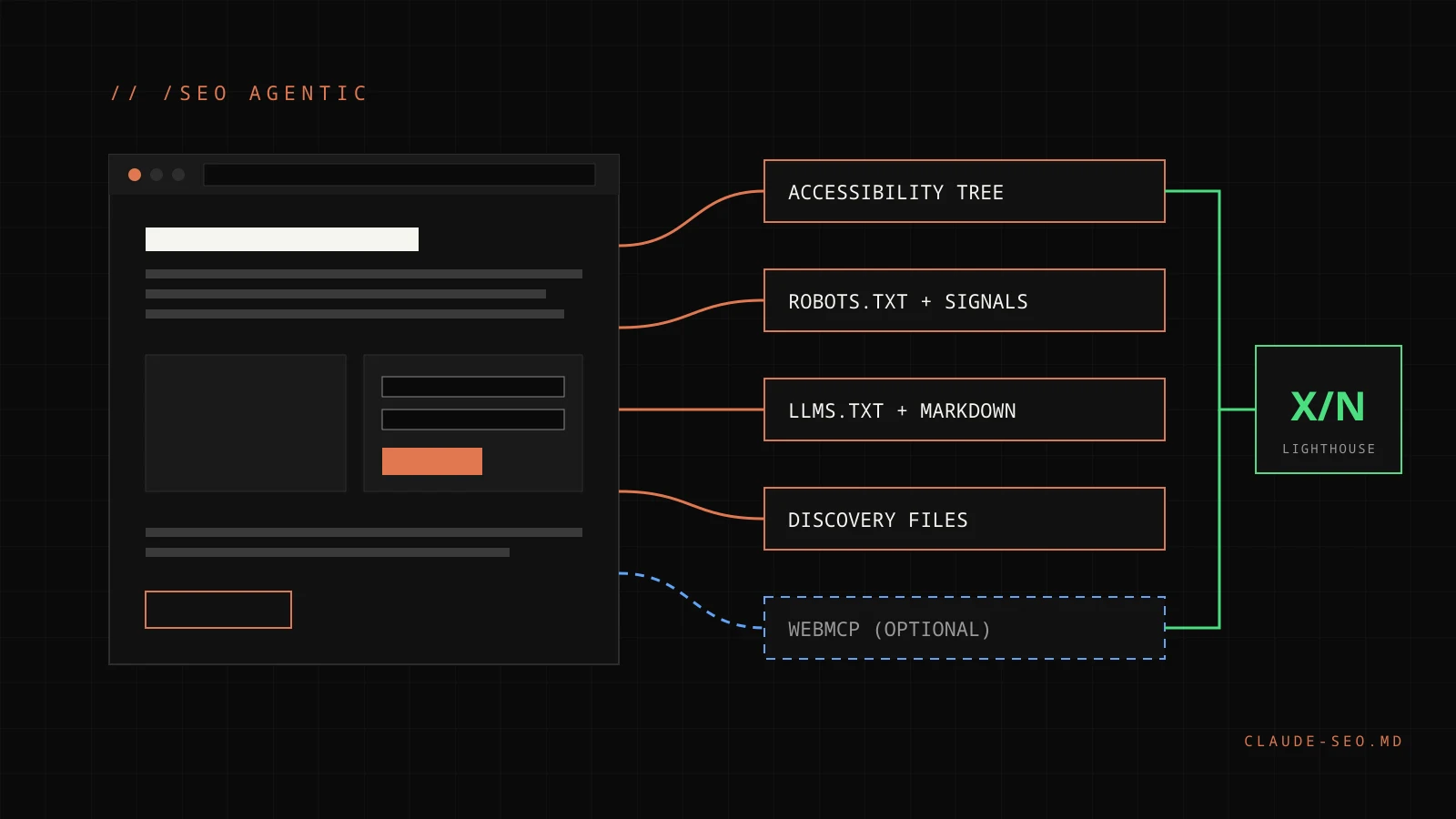
A webpage is checked in layers for AI agents, from the accessibility tree to optional WebMCP tools, feeding a Lighthouse fraction
// RUN PREVIEW

What will happen if you start this skill?

This preview is drawn from the v2.4.0 skill and agent files. It describes the documented workflow; it is not the output of a run on your site.

OUTCOME

An agent-readiness report: the Lighthouse Agentic Browsing fraction for mobile and desktop, a separate accessibility-tree heuristic, and findings ranked P0 to P3.

REQUIRED INPUT

One reachable URL for /seo agentic <url>, or a saved Lighthouse JSON report for the lighthouse mode.

READINESS

The fraction comes from PageSpeed Insights v5; a Google API key avoids the shared anonymous quota. The accessibility heuristic needs Chromium from /seo setup.

LOCAL OUTPUT

A report with per-audit status, evidence such as status codes and headers, separate lines for training, search, and user-triggered agents, and dated standards notes.

SIDE EFFECTS

Fetches the page, robots.txt, llms.txt, and discovery files through the SSRF guard. Fix mode prints drafts only; nothing is deployed and no file is overwritten.

COST + APPROVAL

The optional --ua-matrix check sends AI agent user agents and runs only when you control the site or confirm you are authorized to test it.

// HOW IT WORKS

How does the agent readiness audit work?

The skill starts from one framing: agent readiness is accessibility plus performance plus access policy, with a Markdown and discovery layer on top. WebMCP is an optional enhancement for sites with forms or transactions, not a foundation. The audit runs its checks in a fixed order and keeps each tool's JSON for the report.

  1. Lighthouse fraction. lighthouse_agentic.py reads the Agentic Browsing category through PageSpeed Insights v5 or a saved report and reproduces the Lighthouse report renderer's fraction exactly.
  2. HTTP and markup checks. agentic_check.py covers server-rendered content, robots.txt groups per AI agent and Content-Signal, llms.txt, Markdown delivery, ai-catalog.json, /.well-known documents, WebMCP markup, and whether unknown URLs return a real 404.
  3. Accessibility tree. agent_ux_check.py produces a local 0 to 100 heuristic, presented separately from the Lighthouse fraction.
  4. WAF behaviour, only with authorization. The --ua-matrix option reports how the site treats unverified traffic carrying AI agent user agents. It is never treated as proof that the real agent is blocked.
  5. Commerce handoff. On e-commerce sites a UCP profile is flagged and the depth goes to the e-commerce skill.

In a full site audit, the orchestrator now spawns the seo-agentic agent alongside seo-geo, and its findings feed the AI Search Readiness category.

Primary sources: the seo-agentic skill file, the seo-agentic agent file, and the v2.4.0 release notes.

P0
ACCESSIBILITY TREE
Accessible names, valid roles, and nothing interactive hidden from the tree, checked through the Lighthouse agent-accessibility-tree audit and the local heuristic.
P0
CONTENT AND LAYOUT
Primary content present without JavaScript, and CLS at or under 0.1 as measured by the Lighthouse cumulative-layout-shift audit.
P0
ACCESS POLICY
A reachable robots.txt with deliberate groups per AI purpose, and a WAF that lets verified bots and signed agents through without a CAPTCHA on content.
P1
SIGNALS AND FILES
Content-Signal inside every relevant robots.txt group, an llms.txt that passes the Lighthouse rules, Markdown delivery, and a real 404 for unknown URLs.
P1/P2
WEBMCP TOOLS
Imperative tools bound to existing handlers, registered on document.modelContext, with safety annotations and a human confirmation step for consequential actions.
P2/P3
DISCOVERY
API Catalog and OAuth metadata only if you run APIs; an A2A agent card, UCP profile, and ai-catalog.json only if you have those resources.
// LIGHTHOUSE AGENTIC BROWSING

What does the Lighthouse fraction count?

The skill's reference was verified on 2026-09-23 against the Lighthouse 13.5.0 package and live PageSpeed Insights runs. Lighthouse labels the category as still under development and subject to change, so the numbers below are dated facts, not permanent rules.

AuditHow it scores
agent-accessibility-treePasses only if none of 33 axe rules fail. Colour contrast, heading order, and landmarks are not in that set.
cumulative-layout-shiftLab CLS; passes at a score of 0.9 or higher.
llms-txtA 4xx response is not applicable. Otherwise the file needs an H1, one Markdown link, and at least 50 characters.
ard-schemaValidates ai-catalog.json; not applicable unless a catalog is signalled or found at /.well-known/ai-catalog.json.
webmcp-schema-validityFails on tool errors or warnings; not applicable without WebMCP support or tools.
webmcp-form-coverageInformative until every form carries a tool name or description; never fails.
webmcp-registered-toolsAlways informative, so it never counts toward N.

Not-applicable, manual, and informative audits drop out of N, and every counted audit passes at a score of 0.9 or higher, so N is at most 6. The JSON category score is a weighted mean, not the fraction. The skill therefore reports X/N with the Lighthouse version and form factor, never as a percentage, and lists the changes that would add a counted audit as options rather than goals. A higher N is not a better site.

// USAGE

How do you run an agent readiness audit?

Commands

CommandWhat it does
/seo agentic <url>Full agent-readiness audit (the default mode)
/seo agentic lighthouse <url or file.json>Explains the Lighthouse Agentic Browsing X/N result
/seo agentic fix <url>Drafts fixes: robots.txt Content-Signal, llms.txt, ai-catalog.json, and WebMCP tools
/seo agentic refreshRe-verifies the dated facts in the skill's vendor matrix

Step 1: Install or update Claude SEO

/plugin marketplace add AgriciDaniel/claude-seo
/plugin install claude-seo@agricidaniel-claude-seo
/seo setup
/seo doctor

Manual installs are covered in the installation guide.

Step 2: Run the audit

/seo agentic https://your-site.com

If PageSpeed Insights is out of quota or no key is configured, the skill says so and continues with the HTTP, markup, and accessibility checks. It can also read a local Lighthouse report that you produce yourself.

Step 3: Review the drafts before changing anything

Fix mode prints drafts to the terminal. The robots draft adds Content-Signal to each group and never changes Allow or Disallow lines. The WebMCP draft proposes one tool per real form that submits through the form's own handler. Sends, purchases, and deletes stay marked consequential with a human confirmation step.

Honest-reporting rules

  • No promise of ranking, citation, or traffic gains from any item.
  • No vendor token-savings figures presented as independent evidence.
  • No claim that a named consumer agent requests Markdown or reads llms.txt.
  • Google-Extended, Content-Signal, and llms.txt are never presented as affecting Google Search.
  • Training, search, and user-triggered agent access are reported on separate lines.
  • WebMCP, Content-Signal, ai-catalog.json, and Web Bot Auth are labelled as drafts or proposals with the date checked.
// FAQ

What should you know about agent readiness?

It reads the Lighthouse Agentic Browsing category through PageSpeed Insights or a saved report, then checks server-rendered content, robots.txt groups and Content-Signal per AI agent, llms.txt, Markdown delivery, ai-catalog.json, /.well-known discovery files, and WebMCP markup. A separate local heuristic reviews the accessibility tree that agents rely on.
// RELATED SKILLS

EXPLORE MORE

VIEW ALL 26 SKILLS →

CHECK AGENT READINESS
IN ONE COMMAND.

$
git clone --depth 1 https://github.com/AgriciDaniel/claude-seo.git && bash claude-seo/install.sh
VIEW ON GITHUB ALL SKILLS >